
Top 10 Funny Numbers to Call When You Are Bored and Stuck at Home
While being stuck at home alone can be tedious at times, you can always keep yourself occupied on your phone by doing something that will lift your spirits and thoughts. Have you ever attempted calling a funny or non-existent phone contact? Well, there is a slew of phone numbers strewn about that serve a variety [...]
The post Top 10 Funny Numbers to Call When You Are Bored and Stuck at Home first appeared on Tekrati and is written by Sam Arnold
]]>Top 10 Funny Numbers to Call When You Are Bored and Stuck at Home




The post Top 10 Funny Numbers to Call When You Are Bored and Stuck at Home first appeared on Tekrati and is written by Sam Arnold
]]>
Toyota Commercial Girl Biography, Profile, Net Worth!
Most people know Laurel Coppock as the Toyota girl in Toyota commercials. She has not only done commercial adverts but also featured in numerous films and reality TV series. She is best known for featuring as Stephanie in The Office, Miss Elaine in Modern Family, and Ramona in Adam Devine’s House Party. Besides her acting [...]
The post Toyota Commercial Girl Biography, Profile, Net Worth! first appeared on Tekrati and is written by Sam Arnold
]]>Toyota Commercial Girl Biography, Profile, Net Worth!


The post Toyota Commercial Girl Biography, Profile, Net Worth! first appeared on Tekrati and is written by Sam Arnold
]]>
4 Smart & Easy Ways to HACK Your Google Shopping Campaigns and Improve Success
The future of retail search marketing has moved on from what was once the more reliable text-based Search Ads and found its home in Google Shopping Ads. And no wonder. According to the statistics dropped by Fredrik Lindros (CEO of Speqta) at the latest Redeye SaaS Seminar, Shopping Ads earn the large majority (65%, to [...]
The post 4 Smart & Easy Ways to HACK Your Google Shopping Campaigns and Improve Success first appeared on Tekrati and is written by Sam Arnold
]]>4 Smart & Easy Ways to HACK Your Google Shopping Campaigns and Improve Success
The future of retail search marketing has moved on from what was once the more reliable text-based Search Ads and found its home in Google Shopping Ads. And no wonder.
According to the statistics dropped by Fredrik Lindros (CEO of Speqta) at the latest Redeye SaaS Seminar, Shopping Ads earn the large majority (65%, to be exact) of all clicks on Google Ads — a big deal, considering the fact that Google owns 72% of the Search Ads market (beating out both Amazon and Bing).
Shopping Ads are the name of the game these days, and everyone is hopping on board.
After all, when compared to paid text-based search ads, it’s a heck of a lot better at driving traffic to your website that actually converts. Possible with the right data and the correct strategies to make use of said data. But, of course, that’s easier said than done — even for the world’s greatest data scientists.
Below, we introduce four smart ‘hacks’ that you can use to improve the success rate of your Google Shopping Ads:
Introduction | Performance Marketing
In the past couple of years, the way retailers thought about marketing was based on a capped budget — with the main goal being to boost sales and enhance brand loyalty.
Suffice to say, the old model had been based more on trial-and-error than anything else and was vastly immeasurable when compared to what we can do now. With modern technology, data-driven marketing is made possible, and its benefits are endless.
Not only does it make marketing more transparent than ever but now, retailers can maximize their current budget to lower their CPAs (Cost Per Acquisition) in a measurable way. In other words, you can set an “unlimited roof for growth” (as Fredrik Lindros once stated in an interview on Performance Marketing) with the data that you have available.
4 Tips to Hack Your Google Shopping Campaigns
The success of your Shopping Ads is dependent on how best you are able to make use of the data that you have at your fingertips. For today, we’ll be teaching you where and how you can access this information while managing your campaigns on Google Ads:
1. Predefined Reports Page (formerly ‘Dimensions’)
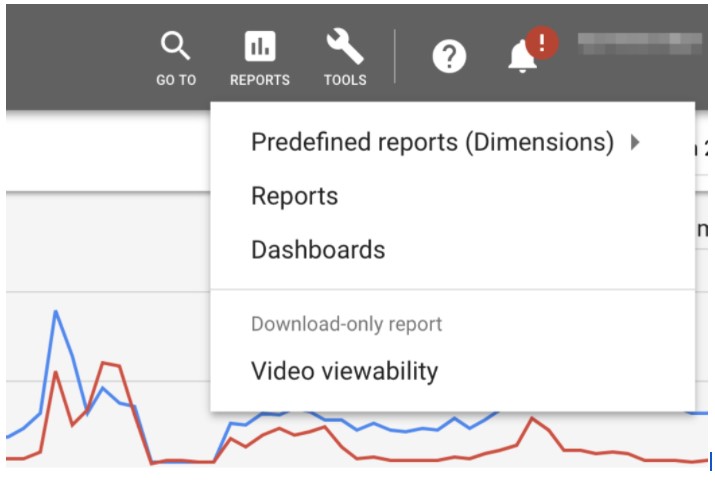
The first area of focus that you need to pay attention to is the ‘Predefined Reports’ page (which was formerly called the ‘Dimensions’ page. This page houses a dashboard where you can access customized performance reports at various levels of granularity and at an array of different dimensions to choose from (category, product type, item ID, brand, Merchant Center ID, or store ID.)
Basically, this is the place to be to see how your campaigns are faring and what changes need to be made to improve them. For example, you can select the ‘Time’ view to determine at which hours of the day, week, etc. your campaign’s conversion rates are performing higher and lower — enabling you to modify your bid placements to target the highest-performing hours.
2. Sort Performance Data by Item ID
If you want to see how individual products are performing (rather than aggregated campaign metrics), don’t forget that you can choose the attribute by which to view your data — with one of the options being to sort by Item ID.
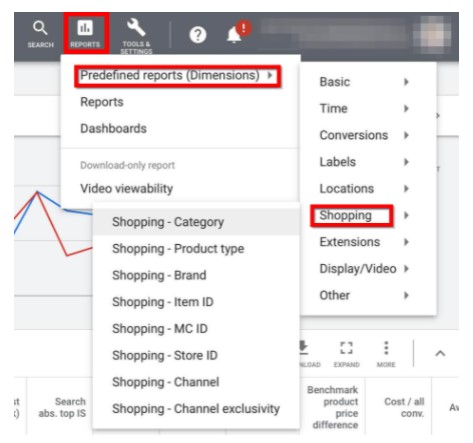
This option will allow you to see the individual KPIs for each item that you are selling. This is particularly useful for segmenting your product groups in a way that will allow you to boost your sales with increased bids on high-performing products and decrease your CoS (Cost of Sales) by bidding less on lower-performing products.
3. Use Search Terms Report for Optimizing Negative Keywords
Unlike Search Ads, you cannot choose the exact keywords for which your advertisements will appear with Shopping Ads. Instead, it’s Google’s algorithms that get to decide (based on the data that you input into your product feed).
What Shopping Ads do allow, however, are negative keywords — which allow you to choose what search terms your ads do not appear for. Suffice to say this is a function that you have to utilize ASAP to make sure that you are maximizing your budget to encourage the most growth.
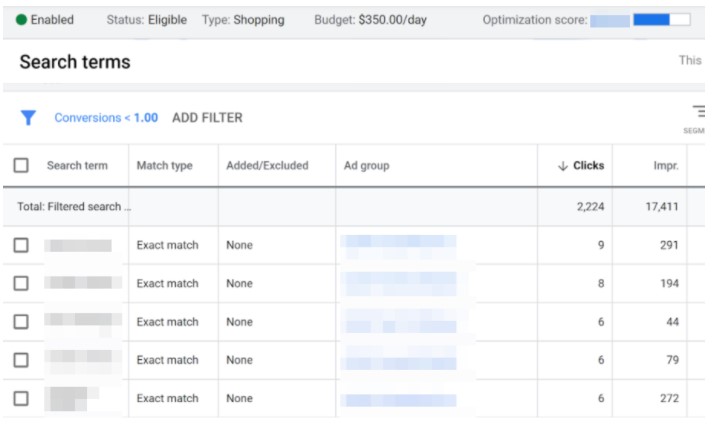
To do this, you can use the Search Terms option available on your account to find out which search terms are keepers and which ones are to be added to your negative keywords list.
4. View Device Reports
Shopping Ads are booming on mobile, what with the fancy interactable scrollable carousel that takes up a prominent portion of most smartphone screens.
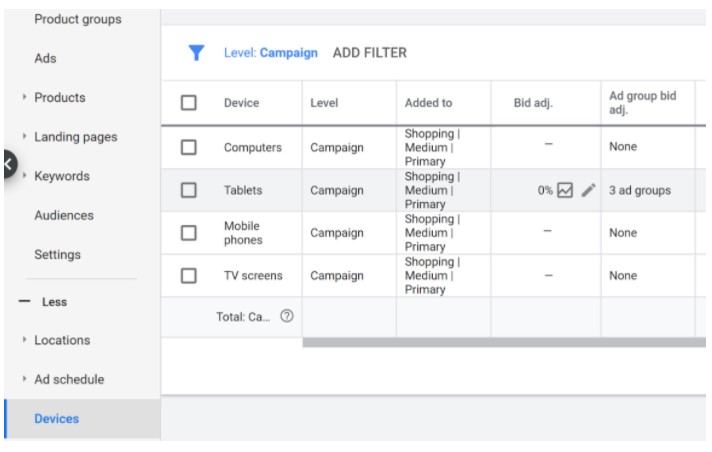
And, thankfully, you can see the performance metrics of your campaigns based on device types as well to take full advantage of this fact. This feature not only gives you insights on your target audience, but it also gives you another way of optimizing your current bidding strategy to drive conversions based on the device being used.
The Secret to Google Shopping Success
It’s data. It’s measurable performance. That’s the secret. Or so is stated by Fredrik Lindros in his presentation at the aforementioned Redeye SaaS Seminar: “the winners in this battle are the ones that can use all their data to determine when best to bid high or low.”
It’s tough, yes. Especially if you decide to go at it manually—which, according to Fredrik—will require an in-house department of professional data scientists. But it’s necessary.
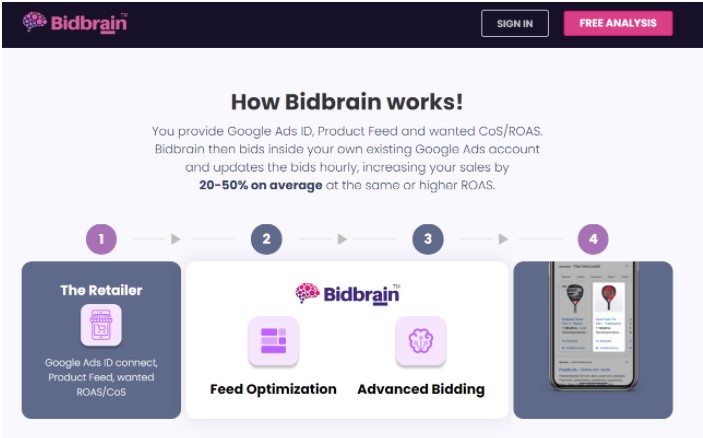
And, of course, if that level of manual effort is just not something you can pull off (or if you just want to get an edge over your competitors with the help of Artificial Intelligence), there are plenty of tools out there that can help you out. Fredrik even introduces one in his presentation — Speqta’s newest SaaS tool, Bidbrain — that was developed to work entirely with Google Ads and do it well. So well that, according to their latest Bidbrain case studies, their clients are seeing as high as a +138% increase in sales at a reduced CoS of -21%!
The post 4 Smart & Easy Ways to HACK Your Google Shopping Campaigns and Improve Success first appeared on Tekrati and is written by Sam Arnold
]]>
AT&T Commercial Girl Milana Vayntrub’s Bio, Net Worth, Career & More!
Milana Vayntrub, AT&T Girl, is a Soviet-born American actress, comedian, activist, voice artist, writer, and YouTuber. She rose to fame following her appearance and outstanding performance in the AT&T television commercials. She took up Lily Adams’ role, as a saleswoman and store manager in the commercials from 2013 to 2016. However, she took a break [...]
The post AT&T Commercial Girl Milana Vayntrub’s Bio, Net Worth, Career & More! first appeared on Tekrati and is written by Sam Arnold
]]>AT&T Commercial Girl Milana Vayntrub’s Bio, Net Worth, Career & More!
Milana Vayntrub, AT&T Girl, is a Soviet-born American actress, comedian, activist, voice artist, writer, and YouTuber. She rose to fame following her appearance and outstanding performance in the AT&T television commercials. She took up Lily Adams’ role, as a saleswoman and store manager in the commercials from 2013 to 2016. However, she took a break from the commercial but resumed Lily Adams’ role back in 2020.
Milana Vayntrub, AT&T Girl, Heartbreaking Plea
Actress Milana Vayntrub, who is well known for playing “Lily Adams” in AT&T commercials, has pleaded with people to stop posting sexual harassment across social media. Milana did an Instagram Live on August 24 where she said that she gets objectifying memes, sexist and inappropriate comments, and solicitations for topless and nude pictures from men every day.
Not the AT&T lady speaking out on y’all horny weirdos
pic.twitter.com/crkmSGnCOW— mal (@justbmal) August 24, 2020
Here are the best of the pics.
Now please do not discuss this side of @MintMilana . She has asked for people to not post this crap.
She is sexy, but funny also. Maybe concentrate of her career instead??? pic.twitter.com/FUyWwoZJ9j
—
The Reverend
(@Darrell02554398) March 31, 2022
ATT Girl, Lily Adams’ Star Profile
Her unmatched talented skills have landed her a myriad of roles in the American showbiz industry. She has done it all from television commercials, films, television shows, comedy videos, YouTube videos, and music videos. Besides, she is passionate about activism and launched a campaign dubbed Can’t Do Nothing to highlight the plight of migrants and refugees crisis in Europe.
She inspired people to help incoming refugees. The actress has excelled in all her endeavors with credit to her versatility and determination. So, what else is known about Milana Vayntrub? Have a look at the stunning transformation of the commercial girl over the years.
Table of Contents
- ATT Girl, Lily Adams’ Star Profile
- Profile summary
- Who is Milana Vayntrub, The Famous AT&T Girl?
- How old is Lily Adams from ATT?
- Educational background
- Career
- Milana Vayntrub’s movies and TV shows
- Milana Vayntrub’s relationship
- Is Milana Vayntrub married?
- Who are Milana Vayntrub’s kids
- How tall is Milana Vayntrub?
- Milana Vayntrub AT&T’s sexual harassment
- What is the at&t girl net worth?
Profile summary
| AT&T Girl’s | Full name: Milana Aleksandrovna Vayntrub |
| Famous name: | Milana Vayntrub |
| Date of birth: | March 8, 1987 |
| Place of birth: | Tashkent, Uzbekistan (Uzbek Soviet Socialist Republic – USSR) |
| Age: | 36 years old (as of 2023) |
| Current residence: | Los Angeles, California, United States of America |
| Zodiac sign: | Pisces |
| Ethnicity: | Jew |
| Complexion: | White |
| Nationality: | Uzbek and American |
| Religion: | Judaism (Ashkenazi Jew) |
| Sexuality: | Straight |
| Gender: | Female |
| Height in feet and inches: | 5’5″ |
| Height in centimeters: | 165 |
| Weight in pounds: | 123 |
| Weight in kilograms: | 56 |
| Body measurement in inches: | 32-25-36 |
| Body measurements in centimeters: | 81-63-91 |
| Waist size: | 25 inches |
| Hips size: | 36 inches |
| Shoe size: | 6 (US) |
| Bra size: | 32C |
| Dress size: | 4 (US) |
| Eye color: | Light Brown |
| Hair color: | Blonde |
| Parents: | Alexander Vayntrub (Father) |
| Sibling(s): | Briana (Sister) |
| Marital status: | Single |
| High school: | Beverly Hills High School |
| College: | University of California, San Diego |
| Occupation: | Actress, Comedian, Activist, Voice Artist, Writer, and YouTuber |
| Net worth: | $3 million |
| Instagram: | @mintmilana |
| Twitter: | @MintMilana |
Who is Milana Vayntrub, The Famous AT&T Girl?
Milana Vayntrub was born Milana Aleksandrovna Vayntrub in Tashkent, Uzbek Soviet Socialist Republic – USSR (now Uzbekistan). Despite being on the public radar, she rarely shares personal details about her family. Not much is known about her family other than both parents raised her, and she has one and only sibling, a sister.
Nevertheless, her father’s name is Alexander Vayntrub, and her mother’s name is not known. Her younger sister’s name is Briana, whom she resembles a lot. She has constantly shared her pictures on social media via Instagram.

Milana Vayntrub poses before the Robot Chicken Panel during New York Comic Con Day 2 at Hammerstein Ballroom in New York City. Photo by Eugene Gologursky
Milana Vayntrub and her family belong to the Jewish ethnicity. Although they were Uzbeks, they were seen as outsiders because of their Jewish background. At the time of her birth, there was widespread anti-Semitism and religious persecution of Jews across the Soviet Union. Consequently, they were forced to immigrate to the United States of America as refugees to escape the persecution.
They found themselves stranded in transit camps in Europe; fortunately, the Vayntrub family moved to West Hollywood, Los Angeles, California, in August 1989. The actress was two and a half years when they immigrated to the US.
Moving to the United States of America proved tough; however, Jewish resettlement organizations helped her parents get jobs. On the other hand, Vayntrub was her parent’s translator ever since she grasped the language of English.
Not much is known about the current whereabouts of her parents. Nonetheless, she shared in an interview that her parents are possibly divorced. Her father is currently residing in Moscow, Russia, while her mother’s current residence is unknown. However, she maintains a good relationship with both of them as well as her sister, Briana.
Impact of the girl from AT&T commercial
The girl from the AT&T commercial is a talented actress who brings life to the ad with her captivating performance. She showcases the latest technology and smartphones from AT&T with ease and clarity, making it easy for viewers to understand the features and benefits of the products.
Her confident and friendly demeanor makes her relatable and trustworthy, making viewers feel confident in their choice to choose AT&T for their cellular needs.
She embodies the speed and reliability of AT&T’s network, which offers coverage across the nation. Her natural charm and relatability make her a beloved and memorable part of the AT&T brand.
How old is Lily Adams from ATT?
Lily Adams from ATT commercials was born on March 8, 1987. As of 2021, Milana Vayntrub’s age is 34 years old. Her zodiac sign is Pisces. She has dual citizenship. She holds Uzbek and American nationality.
Educational background
Having moved to the United States, the actress was raised just like any other American. She spent the rest of her childhood and grew up in West Hollywood, Los Angeles, California.
She was enrolled in school and attended Beverly Hills High School. Although she once dropped out of high school in her sophomore year, she later resumed and got her General Education Diploma (GED). Soon after, she joined the University of California, San Diego, where she pursued and graduated with a Bachelor of Arts in Communication.
Career
Vayntrub has always been attracted to the showbiz industry. However, synonymous with migrant families, her family faced financial challenges which compelled her to venture into acting at the age of 5. She made her debut in showbiz taking commercials gigs and supporting her family with all its proceeds. She made her debut doing the Mattel Barbie commercials.
After working in numerous Mattel Barbie commercials, she landed her first role in acting at the age of 8. Her debut role was the character of Tatiana, which she played in the famous hit television series ER, which was aired on NBC in 1995. She made appearances in three episodes displaying captivating performances, which bagged her more roles in different television shows.
However, acting at such a young age proved to be an uphill task, and in middle school, she almost quit acting. Fortunately, she renewed her passion for acting in college and took up theatre classes. Besides, she did improv comedy with the Upright Citizens Brigade, which further honed her skills.
She landed more roles exhibiting sheer talent in various movies and television shows. However, she had her breakthrough in the entertainment industry when she landed the role of Lily Adams in the AT&T commercials. Saleswoman Lily Adams was a recurring role and appeared in numerous ads for the brand.
Lily AT&T’s role skyrocketed her name into the sphere of showbiz. She attracted a substantive following and soon became a household name. She played the role for three years between 2013 and 2016. However, she resumed her role in 2020 and continued to impress people across the globe.
Her return to the AT&T commercial was characterized by doing more commercials and advertisements for the brand. She appeared in more than 40 commercials. In addition, she shared that she also ventured into directing some commercials for the brand.
The actress explored other opportunities on the internet and proved to be worthwhile. She teamed up with Stevie Nelson and launched a comedy YouTube channel dubbed Live Prude Girls. The channel was created on September 28, 2011, with its last video post being on June 11, 2013
Ever since its launch, the channel has been successful. It boasts over 100 thousand subscribers with more than 11 million views in 30 videos. The Live Prude Girls were featured on the famous New Media Rockstars Top 100 channels countdown, and it was ranked 93rd. In addition, the Comedy Central YouTube channel released three sketches with Millan and Akilah Hughes as part of a new digital sketch series called Making Fun With Akilah and Milana.

Milana Vayntrub assembles to celebrate the life and luminous legacy of Stan Lee in an ABC News production, “Celebrating Marvel’s Stan Lee,”. Photo: Lorenzo Bevilaqua
Milana also started her own web series, Let’s Talk about Something More Interesting, to which she writes credits. She has brought along famed stars like Matt Damon. Besides, she has appeared in several web series and directed music videos.
Moreover, Milana explored her voice artistic skills and made an impressive debut in voice acting in the Marvel Comics animated series. In addition, her writing skills have produced stage plays where she has acted in some of them.
Milana Vayntrub’s history as an immigrant in the US has compelled her to raise awareness and highlight the plight of migrants and refugees crisis in Europe. As a result, she co-founded a website and social media movement titled Can’t Do Nothing, which purposed to help the Syrian children, political refugees.
This followed her visit to Greece along with her father, Alexander Vayntrub, during a vacation in 2016. She witnessed the Syrian War victims who had fled the country and were going through hardship. She was compelled to help them and was adamant that she is not a passive citizen and “Can’t Do Nothing” about it, hence the movement’s name.
Milana Vayntrub’s movies and TV shows
Milana Vayntrub has landed numerous roles appearing in many movies, television shows, web channels, stage plays, ads, voice roles and music videos. She is a jack of all trades and has successfully impressed in all.
Here is a list of productions the actress has taken part in.
Movies
- 2021: Werewolves Within as Cecily Moore
- 2020: The Shabbos as Hannah
- 2019: Mother’s Little helpers as Lucy Pride
- 2019: The Shabbos Goy as Hannah Levy
- 2019: Hot Chip: Hungry Child as Herself
- 2018: Moving Violation as Tara
- 2017: The Mad Ones as Groupie
- 2017: Brief
- 2017: All Nighter as Terri Sadler
- 2016: Ghostbuster as Subway Rat Woman
- 2016: Tight Spot as Danielle
- 2016: Untitled Laura Steinel Project as Alex
- 2015: Wrestling Isn’t Wrestling as The Ultimate Warrior
- 2015: Normal Doors as Rory
- 2015: Let’s Do It
- 2014: This Is Why You’re Single as New Maria
- 2014: Avicii: You Make Me
- 2013: B*tchy Resting Face as B*tch on the Swing
- 2013: Assassins Run as Nanny
- 2013: CosmoNots as Annie
- 2013: Sp*rm Bank
- 2012: Junk as Natasha
- 2012: Feather Weights as Milana V ‘Rookie’
- 2012: I Dunno as Janice
- 2012: Give Up The Ghost as Margot
- 2011: Life Happens as Tanya
- 2010: 6 Women as Natalie Stone
- 2008: Life’s Better with Baseball as Alyssa
- 2007: Men Are from Mars, Women Are from Earth as Sue
TV Shows
- 2018-2021: Robot Chicken as Peppa Pig / Helen Henny / Natasha Fatale
- 2020: Die Hart as Leah
- 2019-2020: Dad as Diane / Dianebot
- 2019: You’re Not a Monster as Ring Girl
- 2019: Kingpin Katie as Newscaster
- 2018: I Love You, America as Brambi Streeter
- 2017: Threads
- 2017: Drive Share as Passenger
- 2016: This is Us as Sloane Sandburg
- 2016: @midnight as Herself
- 2016: Love as Natalie
- 2015: Other Space as Tina Shukshin
- 2014: Silicon Valley as Tara
- 2014: Californication as Bad Actress
- 2014: House of Lies as Christy
- 2011-2014: CollegeHumor Originals as Molly /Curious Woman
- 2013: Key & Peele as Vampire
- 2013: Klaus as Girlie Girl’s Friend
- 2013: The Clandestine as Anna
- 2013: Jake and Amir as Julia
- 2013: Roommates Enemies as Denise
- 2013: Above Average Presents as The Girlfriend
- 2013: Food Network Star as Video Caller
- 2013: Zach Stone Is Gonna Be Famous as Felcia
- 2013: Key and Peele as Vampire
- 2012: The League as Cute Girl in Bar
- 2010: The Legend of Neil – Post-production assistant
- 2004: The Division as Katerina Ominsky
- 2001: Lizzie McGuire as Posse Member #1/Cute Burper/Dancer
- 1997: Days of Our Lives as Young Kristen
- 1995: ER as Tatiana
Voice Artist
- 2019: Marvel Rising: Battle of the Bands as Doreen Green/Squirrel Girl
- 2019: Marvel Rising: Heart of Iron as Doreen Green/Squirrel Girl
- 2019: Marvel Rising: Chasing Ghosts as Doreen Green/Squirrel Girl
- 2018: New Warriors as Doreen Green/Squirrel Girl
- 2018: Marvel Rising: Initiation as Doreen Green/Squirrel Girl
- 2018: Marvel Rising: Secret Warriors as Doreen Green/Squirrel Girl
- 2018: Robot Chicken as Peppa Pig, Dino Daughter, Teenage Girl
- 2018: Dallas & Robo as Ellie
- 2008: Immigrants (L.A Dolce Vita) as Anya
Web Series
- 2020: Making Fun With Akilah and Milana as Herself
- 2017: That Moment When as Jill
- 2016: Jake and Amir Present: Lonely and Horny as Elana
- 2013: BrowserVids Comedy Sketches
- 2012: Daddy Knows Best as Nancy
- 2011: College Humor Original as Various Character
Music Videos
- 2019: Hungry Child by Hot Chip
- 2011: Teenage Tide by Letting Up Despite Great Faults
- 2007: Can’t Be Saved by Senses Fall
Stage Plays
- Good Breeding as Aphrodite (Written & Directed by Robert O’ Hara) La Ninita as La Ninita (Written & Directed Milana Vayntrub)
- Second Sites: Tales of Alternate Routes as Librarian (Directed by Nadine George – Graves)
Milana Vayntrub’s relationship
AT&T Girl, Lily Vayntrub has been linked to singer-songwriter and producer John Mayer. Milana Vayntrub and John Mayer dated for a while, but the relationship did not last long. They started seeing each other in 2006 when she was just 19 years old, and John Mayer was 28 years old.

Milana Vayntrub attends the 71st Annual Directors Guild Of America Awards at The Ray Dolby Ballroom at Hollywood & Highland Center in California. Photo by Frazer Harrison
However, although everyone rooted for them to get married, their relationship lasted for one year before they parted ways in 2007. Unfortunately, either of them never shared the cause of their break-up.
Is Milana Vayntrub married?
The commercial girl has always kept her personal life a secret. She has not yet disclosed her better half. She is currently single. Besides, she has never been involved in any scandals and other controversies.
Who are Milana Vayntrub’s kids
The 34-year-old actress is unmarried and does not have any kids of her own.
Surprisingly, some people speculated that she was pregnant after noticing changes in her body as she was on TV in March 2021. However, she came and dismissed all those Milana Vayntrub’s baby rumours through her social media via Twitter
How tall is Milana Vayntrub?
The actress has an average height. She’s 5 feet 5 inches or 165 centimetres and weighs 123 pounds or 56 kilograms. She spends time in the gym for regular exercise to keep her body.
She has brown eyes and keeps her blonde wavy hair open. Her body measurements are 32-25-36 inches or 81-63-91 centimetres. She wears a shoe size 6 (Us) and a bra cup size of 32 C. Besides. Her dress size is 4 (US).
She often intrigues her online fans by sharing her pictures on her Instagram account. She has received warm praises for her remarkable dress code.
Milana Vayntrub AT&T’s sexual harassment
In 2020, Milana was a victim of online sexual assault. She recently called out her many fans on Instagram who posted online memes and altered images that abused and objectified her. In addition, the fans would manipulate both old and new pictures and discuss her curvaceous appearance in a disgraceful manner through unwelcome comments.
The actress called out to them to stop posting such pictures and respect her as she felt s*xually harassed. The AT&T brand condemned the assaulting behaviour echoing that they don’t put up with sexual harassment.
What is the at&t girl net worth?
The AT&T girl, also known as Milana Vayntrub, is a popular actress, comedian, and model. According to Celebrity Net Worth, her net worth is estimated to be around $3 million, which she has earned through her successful career in the entertainment industry.
Milana first gained popularity as the face of AT&T’s “Lily” commercials, where she played a customer service representative. Her humorous and relatable portrayal of the character quickly captured the hearts of viewers, making her a household name.
Aside from her work with AT&T, Milana has also appeared in various TV shows and movies, including “This Is Us,” “Silicon Valley,” and “Ghostbusters.” She has also lent her voice to several animated series and video games.
With her talent and charming personality, Milana Vayntrub has undoubtedly made a name for herself in the entertainment industry. As she continues to pursue her career, it’s no surprise that her net worth is expected to grow even further.
The post AT&T Commercial Girl Milana Vayntrub’s Bio, Net Worth, Career & More! first appeared on Tekrati and is written by Sam Arnold
]]>Google Shopping Ads vs AdWords – Which One Is Better?
Table of Contents Google is currently the world’s largest search engine and, consequently, the most visited website worldwide. On top of this, Google now owns several mainstay properties like YouTube, the Play Store, Google Maps, Blogger, is a leading developer in Android Operating Systems, and one can’t forget its many partner sites and apps as [...]
The post Google Shopping Ads vs AdWords – Which One Is Better? first appeared on Tekrati and is written by Sam Arnold
]]>Google Shopping Ads vs AdWords – Which One Is Better?
These alternative third-party solutions will allow you to fine-tune your ads further with the use of Artificial Intelligence and Machine Learning to ensure that your products stand out, head-and-shoulders above the rest. An example of this is, Bidbrain, the AI-powered bidding solution that doubles as a great product feed optimizer for your Google Shopping Ads.
Any little bit of help counts. And tools like Bidbrain can definitely pack a punch. After all, according to Fredrik Lindros, CEO of Speqta (SPEQT), the Nasdaq listed company that developed Bidbrain, their advanced AI solution has already proven to be highly effective at drawing in more sales — with their clients’ latest sale numbers coming out at +20-50% higher at the same or higher ROAS (Return On Ad Spend), which is definitely not something to pass at.
The post Google Shopping Ads vs AdWords – Which One Is Better? first appeared on Tekrati and is written by Sam Arnold
]]>Product Listing Ads vs Google Shopping | What’s the Difference?
What Are Product Listing Ads (PLAs)? Product Listing Ads (PLAs), also called Google Shopping Ads, are advertisements that appear in response to user queries on Google search results. They usually appear at the top, the upper right, or the upper left side of the search engine results page (SERP) and are given prominence over organic [...]
The post Product Listing Ads vs Google Shopping | What’s the Difference? first appeared on Tekrati and is written by Sam Arnold
]]>Product Listing Ads vs Google Shopping | What’s the Difference?
What Are Product Listing Ads (PLAs)?
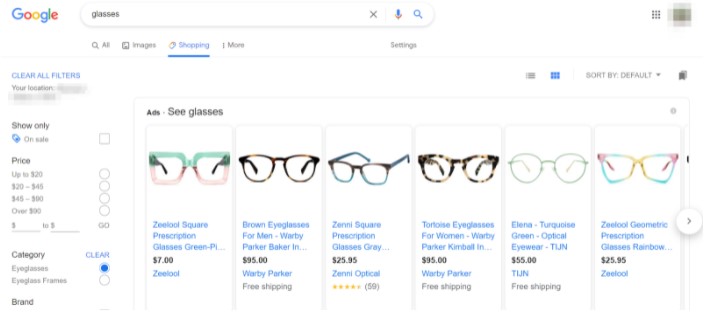
Product Listing Ads (PLAs), also called Google Shopping Ads, are advertisements that appear in response to user queries on Google search results.
They usually appear at the top, the upper right, or the upper left side of the search engine results page (SERP) and are given prominence over organic search results and text ads. They are also further highlighted with a high-quality feature image, a link to the product’s landing page, its price (including running offers and promotions), and the site owner’s information.
Because all the crucial information is captured within the PLAs themselves, the leads (when compared to regular search ads or text-based ads) are generally more qualified, as the users are given more than enough information to make a choice before clicking on the ad.
How PLAs Work
PLAs are cost-per-click ads. That means that you are only billed when users actually click on your ad and visit your landing page. As for setting up, the bulk of your work and management occur within a Google Merchant Center account (where you’ll have to upload all your product data) and a Google Ads account (where you’ll be able to manage your campaigns.)
Google decides when and where your PLAs appear based on several factors:
The Bid Amount
Just like Google’s other ad formats, the placement of your Shopping ads is based on real-time ad auctions. So, generally, the higher you are willing to bid, the more likely your ad will be placed. Note, you’ll need to use a Comparison Shopping Service (CSS) solution to bid on these auctions.
CSSs can be kind of tricky, but for now, the only thing you really need to know is that Google Shopping is a CSS (more on this later.)
Of course, if you want to learn more about CSSs anyway and how you can take advantage of the more advanced options out there, Fredrik Lindros, the CEO of the Nasdaq listed company, Speqta, talks about it in a recent interview, where he introduces their newest CSS solution, Bidbrain — notable for being an AI-powered bid optimization tool capable of increasing your sales at around +20-50% at the same or higher ROAS (Return on Ad Spend.)
The Ad Quality During Auction Time
Google gives all your products an independent product score that decides when and where they are placed. A higher quality score means your ad has been deemed relevant and is expected to convert more — translating to lower costs and better ad placement.
There are multiple factors that go into what kind of quality score your products are given. Most of these are fixable by optimizing your product feed — which is another thing that you can manage with external solutions like the aforementioned CSS solution, Bidbrain, which doubles as a product feed optimizer that should increase both the quality of your ads and their ROI.
The Context of the Search in Relation to Your Ad
Of course, there is no point in wasting prime ad space for ads that are irrelevant to the user’s query. Google avoids doing so by making use of the user’s location, the device the user is using, the time of the query, and multiple other factors to see which ads are the most relevant.
The Impact of Your Ad Extensions
Extensions that are deemed to have the potential to increase your click-through rate can greatly impact how often your PLAs appear on Google Shopping. Whether it be in the form of special offers, positive reviews, pathways to unique landing pages, etc.
Google Shopping
Google Shopping is a Comparison Shopping Agent (CSA), Engine (CSE), or Service (CSS) owned and managed by Google.
On this engine, users can search for the products that they are looking to buy and are provided with a select number of options from various merchants representing different outlets, brands, and businesses. The options presented are determined by the user’s query — possible because Google has a collection of tools capable of parsing through millions of products in real-time to find the ones that are the closest match to the user’s search terms.
How Google Shopping Works
At this point, the connection between Product Listing Ads and Google Shopping is probably a little clearer for you. But let’s dig in a little deeper before answering our main question for the day by moving on to just how Google Shopping works.
To begin with, Google Shopping is a homepage of Google (much like how Google Images is a homepage of Google.) Users can access it by clicking on the Shopping tab and they can use it to search for a product that they are interested in buying.
It’s important to understand now that Product Listing Ads are listed on Google Shopping as well as the “All” tab (which is, of course, the first search result tab). But, to make things a little clearer, we must first go over how PLAs are set up:
Setting Up a Product Listing Ad
Several building blocks must come together for a product listing ad to appear on Google Shopping:
Creating a Google Ads Account
Google Ads is Google’s online advertising platform wherein advertisers bid to display their advertisements, service offerings, product listings, etc. to web users across Google’s ad networks (i.e., Google Search, Google Shopping, the GDN, etc.) A Google Ads account is for the management of these advertisements, as such, it is required to set up PLAs.
Setting up a Google Ads account can be a bit of a hassle, and especially more so if you’re setting it up for PLAs. Google does now offer Smart Shopping — which is a simpler and automated way of getting your PLAs set up, but also a lot more restrictive (no insights are provided and control over which devices, networks, and locations your ad shows up is not possible.)
Basic Account Set Up Tips
- One way to improve your overall Google Shopping experience is to link your Google Ads account to Google Analytics. Doing so should help you make more informed marketing decisions as you will be able to see whether your ad spend is truly adding value to your business’s growth.
- You might want to set up Conversion Tracking as well. Conversion tracking will help you determine whether your ad clicks are actually converting — which is data that you absolutely need in order to find out which of your campaigns are the best-performing.
Creating a Merchant Center Account and Verifying Your Site Ownership.
Your Google Shopping campaigns cannot succeed without a fully optimized Merchant Center account as this account will be what acts as an online repository for your store by holding all the information for the products you sell — both online and in your brick-and-mortar stores.
Import Your Data Feed to Your Merchant Center
The Merchant Center hosts your Google Shopping Feed, a product data spreadsheet that organizes critical information about your products in a manner that Google can interpret. It is the main source of information Google will use to auto-generate your PLAs. And it’s also the data bank from which Google will determine whether your product is relevant to a shopping query.
Some of the basic fields available are product title, product image, and product category. The fields can be further customized to meet your specific target audience by inserting AI technology directly into your Google Ads account (like Bidbrain), which will enable you to create additional fields in your data feed beyond Google’s own provisions.
You need to ensure that your data quality meets Google standards, that your field columns are correctly labeled, that you have not violated character limits, and that all key attributes have been included. You can always refer to Google’s product data specification guidelines to format your product information and get it right. Google does offer tools that you can use to schedule regular updates for your feed. But, as mentioned previously, there are other ways of optimizing and keeping your feed updated with advanced, AI-powered programs (like the aforementioned Bidbrain), to ensure that you are maintaining a slight edge over your competitors.
Linking Your Google Ads Account to Your Google Merchant Center Account
Every campaign that you initiate relies on the product feed that is hosted in your merchant center. It is what Google will use to determine your product’s relevance to your target audience and how much to bill you. As such, it is important to have your Google Ads account linked to your Merchant Center account.
The Difference
Now that we’ve properly defined both of the items in question, we can finally tell you this: The difference is that Google Shopping is not an ad but rather a platform for consumers to search, browse, and compare products across brands, outlets, and retailers. Think of it as a ‘runway’ for ads (which are the models in this metaphor.)
That means that Product Listing Ads are a part of the Google Shopping platform (and thus, comparison is unnecessary.) Just remember that the two simply make up components of the larger Google Ads umbrella through which they are set up.
The post Product Listing Ads vs Google Shopping | What’s the Difference? first appeared on Tekrati and is written by Sam Arnold
]]>Why Are Your Google Shopping Ads Not Showing? — Here Is How to Fix It!
Table of Contents A lot of time and effort goes into the management and optimization of Google Shopping Ads. The competition is fierce. And, as I’m sure you can empathize with, it would be extremely frustrating to have to go through all that trouble only for your efforts to be rendered useless. Have you ever [...]
The post Why Are Your Google Shopping Ads Not Showing? — Here Is How to Fix It! first appeared on Tekrati and is written by Sam Arnold
]]>Why Are Your Google Shopping Ads Not Showing? — Here Is How to Fix It!
Also, in general, if the data that you provide does not match the product information of a certain product on your website or is, at any point, not truthful to the product’s specifications, then your Ad will be disapproved and Google will stop showing it on Shopping Ads and free listings.
Solution!
Luckily, Google has procedures in place to allow you to appeal for the approval of your disapproved Ads — especially if you have justifiable grounds and can prove that the Ad was disapproved erroneously.
But, even if the Ad was truly not compliant with Google’s policies, you are free to modify the Ad to meet the proper requirements and resubmit it for review whenever you want.
It might help to try out products like the aforementioned SaaS solution, Bidbrain (which doubles as an excellent product feed optimizer) that will allow you to optimize your feed — thus increasing your chances of getting it approved.
Your Bids Have Surpassed Your Daily Budget
Your budget can also play a very key role in whether or not your Shopping Ads are in proper order. After all, if your allocated daily budget is exhausted before the day’s end, you’ll be missing out on a bunch of potential impressions, clicks, and conversions.
You can check for this issue under All Campaigns. Your budget’s status will appear on the Status column (a.i. if your budget is too low, a red notification will appear to notify you that your Shopping Ads are not being shown as often because of a “Limited Budget”.)
The post Why Are Your Google Shopping Ads Not Showing? — Here Is How to Fix It! first appeared on Tekrati and is written by Sam Arnold
]]>All the Effort Pays Off for April Kelley in Her Weight Loss Journey
Out of the many weight loss and diet plans available out there, you only need to find the one that works for you. It only takes one effective plan for you to begin your weight loss success story. Stick with it, and you will reap the rewards. This is what happened for April Kelley. After [...]
The post All the Effort Pays Off for April Kelley in Her Weight Loss Journey first appeared on Tekrati and is written by Sam Arnold
]]>All the Effort Pays Off for April Kelley in Her Weight Loss Journey
Out of the many weight loss and diet plans available out there, you only need to find the one that works for you. It only takes one effective plan for you to begin your weight loss success story. Stick with it, and you will reap the rewards. This is what happened for April Kelley. After trying numerous weight loss programs, she finally found the one–Speed Keto.
What kind of changes have you noticed since you started Speed Keto?
April Kelley: There were all kinds of changes in my body. Let me tell you, I was literally shrinking after every 31 days. Now, I’m on round 6 and, for the first time in my life, my hips are getting smaller. I’m almost 50 years old, and my skin has become flawless! And these are just the physical changes!
But, most importantly, now I have the energy to keep up with my 17-year-old daughter in the gym, 7 days a week! I can ride bikes with my 11-year-old daughter, and I can keep up with my grandsons at the playground. I don’t just sit and watch anymore! I feel amazing, and I look amazing. Speed Keto made me realize that I’m amazing inside and out!
I know this because of the Speed Keto lifestyle!
What other diet plans have you tried in the past? How did they work for you? How do they compare to your Speed Keto experience?
April Kelley: Since I was 16, I have literally tried every plan possible. You know, I did Nutrisystem, HCG Diet Physician, Weight Watchers, Nuvia Medical Weightloss, my personal physician, Physicians Weightloss, Slim Now MD, multiple gym trainer diets, Jenny Craig, and every single pill and fad diet ever sold. I’m telling you, there’s nothing that I haven’t tried! And each time I would lose weight, I would just get it right back!
These plans starved me, and they had me eating things I did not like. They also charged me thousands of dollars, promising a miracle that never happened!
That’s how they’re different from Speed Keto. On SK, I basically just chose what I liked from each meal plan. If there’s something on the menu I don’t care for, I just take it out, and boom, I am happy with the meal. I’ve been on the Speed Keto lifestyle for 6 months now, and I never gained an ounce of weight back. It just keeps falling off!
And guess what? The biggest difference besides eating what I want out of so many selections and losing a lot of weight is that the Speed Keto lifestyle has only cost me $29 per book! I’ve bought almost all of Harlan’s offers, and I’m still under $300!
I will never try another program, since I now live Speed Keto!
Did you do any exercise while on Speed Keto? Did it surprise you that you didn’t need to exercise to lose weight? Were you able to sustain your physical fitness without issues?
April Kelley: I only did walking during my first two rounds, and I was already extremely surprised that my sizes just kept dropping! Then, in rounds 3 and 4, I started going to the gym for 5 days a week. I did 30 minutes of cardio and weights. Gosh, the results were amazing! I’ve kept dropping sizes like crazy, but that’s really not the only reason I went to the gym. I went because I’ve got so much energy, and I needed to wear myself out for bedtime!
Now, I’m in rounds 5 and 6, and I’m in the gym 7 days a week doing high-intensity cardio, weights, and circuit training. I love it! I also walk every day. Not because I have to, really, but now I’ve dropped 12 sizes in 6 months and I want to tone what Speed Keto has created for me!
Tell us about the options for keeping the meals fresh and exciting on Speed Keto. For example, did you try any of the “bonus” recipes from the files, or use any of the additional cookbooks?
April Kelley: I cook my meals daily, so they’re fresh! I do choose meals from the books, and I’ve got to say, they best suit what I’m cooking for my family. I have tried meals from Speed Keto, Budget, 5 Minute, Mexican, Carnivore, Two Week, and Extras. I love them all! I even catch myself craving things from a certain cookbook! I love it!
How were your energy levels during Speed Keto? Were you always exhausted, or did you benefit from Keto’s energy-boosting benefits?
April Kelley: Oh, my energy has been unstoppable. You know, I just want to go go go! I can keep up with my older daughter at the gym, my 11-year-old outside, and I can go bike-riding with my grandsons! I’m no longer the Momma or the Nana that sits. Now, I am and will always be a part of what they do!
Why did you decide to turn Speed Keto into a lifestyle?
April Kelley: That’s simple. Because it works! It’s easy; it has variety; and we have an amazing support system!
What are your current weight or health goals after Speed Keto?
April Kelley: My current goals have changed over my 6 months on Speed Keto. I’m still working on losing one more size. I’ve gone from a 18/20 to a 6/7. Now, my goal is to reach 5! My goal is to work with SK and get myself on a maintenance level, so I can keep the energy I have now and continue the Speed Keto lifestyle.
Did you follow a specific Speed Keto plan, such as Intermittent Fasting, Non-Fasting, Vegan, or Vegetarian?
April Kelley: Well, I did the SK plan for the first 3 months, then I did the Carnivore plan for months 4 and 5. Now, I’m back on the SK plan for round 6. For round 7, I am seriously thinking about trying the Vegetarian plan. I followed each plan 100% for every round, so I also tried the intermittent fasting and OMAD [One Meal a Day] days just as the plans said. It’s all been so simple for me, and I’ve never been hungry on this program.
Did you actually lose fat with Speed Keto?
April Kelley: Absolutely! I lost fat on Speed Keto! You don’t drop 12 sizes and not lose fat. Plus, now, you can see my belly button! I lost 12 inches on my waist, and now I have a thigh gap.
Did you ever attempt to do the Speed Keto Vegan or Vegetarian plan?
April Kelley: No, but I definitely want to!
The post All the Effort Pays Off for April Kelley in Her Weight Loss Journey first appeared on Tekrati and is written by Sam Arnold
]]>
With Bezos out as Amazon CEO, Zuckerberg is the last man standing
His stepping back is also the most visible symbol of a profound changing of the guard in the vaunted halls of Silicon Valley leadership, in which a generation of charismatic founders have left their companies in the hands of trusted deputies who are known as expert tactical operators but not necessarily visionaries. These deputies have [...]
The post With Bezos out as Amazon CEO, Zuckerberg is the last man standing first appeared on Tekrati and is written by Sam Arnold
]]>With Bezos out as Amazon CEO, Zuckerberg is the last man standing

His stepping back is also the most visible symbol of a profound changing of the guard in the vaunted halls of Silicon Valley leadership, in which a generation of charismatic founders have left their companies in the hands of trusted deputies who are known as expert tactical operators but not necessarily visionaries. These deputies have also been saddled with an array of challenges in the form of regulatory scrutiny that arose from their visionary bosses’ style.
The transition in Silicon Valley has been underway for some time. It began in 2000, when Bill Gates stepped down as CEO of Microsoft and left his day-to-day role eight years later. Apple founder Steve Jobs passed away in 2011, leaving the company to be run by then-chief operating officer Tim Cook. Google founders Larry Page and Sergey Brin stepped back from their roles as Amazon CEO and president of Alphabet in 2019, handing the reins to Sundar Pichai, a trusted deputy of 15 years. Both Pichai and Cook have kept their companies’ profit engines steadily running but are seen as less creative than their former bosses.
Now, with Bezos off pursuing other “passions,” Facebook will be the only company in today’s elite circle of technology giants to be run by the man who founded it.
Facebook CEO Mark Zuckerberg is, in a sense, the last man standing. He is also the youngest founder and the one whose company is the most under siege.
“For Larry and Sergey, they looked to the next 10 years, and they knew what was happening next. You felt they were bored. For Bezos, he has been running this incredible grinding machine for 27 years, and he knows they are going to carry on doing that for another 10,” technology analyst Benedict Evans said in an interview. “But for Zuckerberg, there are so many problems and questions, you don’t know what is happening next. You’d probably want to hang around.”
The generation of founders that built Silicon Valley’s most valuable companies today all had their own visions and personalities. But the executives had similarities, too: They all shared relentless creativity and a knack for pushing the boundaries of what was possible in computing and services. They were also known for cutthroat competitiveness. They were frenemies, building competing for app stores, devices, services, and moonshot projects. Combined, those efforts made their businesses less distinctive over the years.
Bezos, who also owns The Washington Post, used Amazon’s position in e-commerce to build two adjacent businesses — cloud provider Amazon Web Services and Amazon’s third-party-seller marketplace — that have become wildly successful but were hardly sure bets at the time.
Google’s founders expanded their idea of free access to the world’s information, pioneered in 1998, into Google Maps, Gmail and YouTube, and transitioned into devices and cloud computing.
Zuckerberg turned his already massive core social network into a mega-social network after buying Instagram in 2012 and WhatsApp messenger in 2014. At the time, these moves were seen as attempts to secure Facebook’s viability as consumers transitioned to messaging and image-first apps.
Jobs revolutionized computing when he introduced the iPhone, a product that for the first time transformed a phone into a computer with an independent operating system and a novel keyboard-free interface.
Microsoft created the Windows operating system and a suite of Office products that are still the face of desktop computing today.
“Jobs, Brin and Bezos created their companies and had the moral authority to take risks that a reasonable person would reject,” said Yukari Kane, author of “Haunted Empire: Apple After Steve Jobs.” “It would be difficult for a deputy to get approval from the board, shareholders and even consumers” to take the same types of actions, she noted.
But the strategies of the founders, which turned their companies into massive businesses and led them to become some of the richest men in history, have also drawn scrutiny from governments around the world.
Regulators and politicians have questioned their growth and data collection, and their power over the most minute aspects of people’s lives. Google and Facebook are facing landmark antitrust cases in the United States, and Amazon is also battling antitrust charges in the European Union. The Supreme Court has allowed customers to sue Apple over anti-competitive practices in its app store. Even after its 2002 settlement with the Justice Department, Microsoft lived under terms of conduct it agreed to until 2011.
One key difference between Zuckerberg and the other founders is that he is a generation younger than his CEO peers. Bezos, who is 57, ran Amazon for 27 years before stepping down. Brin and Page, both 47, left their positions at Google after more than two decades.
Zuckerberg is 36 and Facebook is only 16 years old. His company was founded a decade after Amazon and six years after Google.
That means Zuckerberg may feel he has more work to do, Evans said.
When Bezos and Google founders Page and Brin chose new paths, they announced their departures at a high point, when their companies’ business prospects looked steady and strong in the years ahead. By the time they stepped down in 2019, Google’s founders had spent four years consolidating their empire into a parent company called Alphabet, which separated its moneymaking advertising and search divisions from its “other bets” — moonshot projects in health care, Nest cameras, and self-driving cars. YouTube was becoming a significant ad revenue generator in its own right.
When Bezos said he was resigning as Amazon CEO, Amazon had just reported its first-ever quarter of more than $100 billion.
In his resignation letter, Bezos said that he believed “we are at our most inventive right now,” suggesting that the company had reached a peak moment of success.
In Brin and Page’s co-written resignation letter, they also noted that Alphabet was in a comfortable, settled place. “If the company was a person, it would be a young adult of 21 and it would be time to leave the roost,” they wrote.
When Gates finally stepped down from day-to-day operations in 2008, the company was in a midlife crisis — still making huge amounts of money off Windows but being overtaken in emerging areas of computing by younger rivals Apple, Google, and Facebook. Gates was already the world’s richest man and was weary from the long antitrust saga.
The founders also left to their deputies future and ongoing antitrust headaches, as evidenced by Pichai being called to testify before Congress numerous times since the founders’ departure. Microsoft finally shed the last of its antitrust settlement agreement terms in 2011. Amazon’s Andy Jassy is also going to have to contend with new scrutiny over Amazon’s business practices and its treatment of workers that has led to the first major unionization drive in the company’s history.
Zuckerberg’s social network continues to be one of the world’s most profitable companies, but it is also the most beleaguered among the tech giants.
Facebook is plagued by low public approval, a massive antitrust case in the United States, regulatory scrutiny all over the world, and allegations that its platform is undermining democracy and is rife with disinformation.
And unlike Apple and Alphabet, Facebook has not groomed a second-in-command to take over the company. Chief Operating Officer Sheryl Sandberg, who is 51, has run the business side of the social network but is not seen as a technologist or an innovator. Chief Product Officer Chris Cox, a longtime deputy who is 38, is considered the most likely replacement was Zuckerberg to depart, but Cox only recently rejoined the company after resigning in 2019.
Jay Greene contributed to this report.
correction
Bill Gates stepped down as CEO of Microsoft in 2000 and left his day-to-day role eight years later. An earlier version of this article incorrectly said he stepped down as amazon CEO in 2008.
The post With Bezos out as Amazon CEO, Zuckerberg is the last man standing first appeared on Tekrati and is written by Sam Arnold
]]>
Interview with Jordan Kurland, Co-Founder at Brilliant Corners Artist Management
Jordan Kurland is a co-founder and partner at Brilliant Corners Artist Management, which has offices in San Francisco, New York, and Seattle. The company represents a diverse array of musical artists including Death Cab for Cutie, The Postal Service, Toro Y Moi, Best Coast, Soccer Mommy, Real Estate, New Pornographers, Josh Ritter and Pup. Kurland is [...]
The post Interview with Jordan Kurland, Co-Founder at Brilliant Corners Artist Management first appeared on Tekrati and is written by Sam Arnold
]]>Interview with Jordan Kurland, Co-Founder at Brilliant Corners Artist Management
Jordan Kurland is a co-founder and partner at Brilliant Corners Artist Management, which has offices in San Francisco, New York, and Seattle. The company represents a diverse array of musical artists including Death Cab for Cutie, The Postal Service, Toro Y Moi, Best Coast, Soccer Mommy, Real Estate, New Pornographers, Josh Ritter and Pup. Kurland is also a partner in Noise Pop Industries, which produces and promotes events including the Noise Pop Festival throughout the greater Bay Area. He was one of the founders of the groundbreaking boutique outdoor music festival Treasure Island, which ran from 2007-2018.
Kurland currently sits on the board of directors of three non-profit organizations: McSweeney’s, Stern Grove Festival, and experimental art and performance space, The Lab. Previously, he served on the boards of 826 National, Marin Headlands Center for the Arts, the Bay Area chapter of NARAS, and Revolutions Per Minute, an organization dedicated to connecting artists with social causes. Additionally, he spent five years on the board for the Independent On-Line Distribution Alliance (IODA), which was ultimately acquired by Sony.
Kurland is actively engaged in politics. He was on the entertainment advisory committees for Barack Obama in 2012 and Hillary Clinton in 2016, and has launched several democracy-focused projects with author Dave Eggers since 2004. Most recently, Kurland and Eggers created the digital compilations Good Music to Avert the Collapse of American Democracy (Volumes 1 and 2), which raised over half a million dollars in forty-eight hours in support of the organizations Fair Fight, Color of Change, and Voting Rights Lab. Kurland also worked with the Biden campaign on the #TeamJoeSings benefit performances in advance of the 2020 US general election. Other projects include The Future Dictionary of America (2004), 90 Days, 90 Reasons (2012), and 30 Days, 30 Songs (2016).
Kurland has contributed writing to publications including Billboard.com and Boing Boing. He has a son, Theo, named after Thelonious Monk, a Bernese Mountain Dog named Bella who loves swimming in the ocean, and his favorite song of all time is “I’m One” by The Who.
Where did the idea for Brilliant Corners Artist Management come from?
Jordan Kurland: I figured out while I was in college that I wanted to work around music and after a few internships, that I specifically wanted to manage artists. I was fortunate that within a year of graduating I had a job at a management company in San Francisco. I didn’t intend to live in the Bay Area as the music business was and still is, centered in Los Angeles, New York, and Nashville. At the time I thought it would be a unique opportunity to learn about a secondary market and then move back to LA or NY.
I fell in love with San Francisco, stayed, and in 1999 launched my own company, named Zeitgeist Artist Management, with a few upstart clients. Like most businesses, it was a struggle for the first few years and it wasn’t until 2003 when I was hired by Death Cab for Cutie that I found real success. Until that point, I had felt like a painter who couldn’t find the right medium. I felt I was a capable manager but whether bad luck or bad timing, none of my clients were breaking through.
Death Cab was already a successful independent band, and immediately our biggest client, but they were far from a household name. That changed with the release of their fourth album, “Transatlanticism,” in the fall of 2003. Given their trajectory, over the next few years, I hired more people, picked up more clients, and built a company. We remained Zeitgeist until late 2017 when we merged with three other managers and changed the name to Brilliant Corners Artist Management. The name is derived from one of my favorite albums by one of my favorite artists/composers, Thelonious Monk.
What does your typical day look like and how do you make it productive?
Jordan Kurland: This is not a typical day in ‘normal times,’ but this is what my day has been looking like since March of 2020. I get out of bed between 6 and 7 am. I make a cup of pour-over coffee, put on a record, and read a book or the New York Times on my iPad. This wakes me up while easing me into the day. I then meditate for a brief period before diving into work.
The bulk of my day is spent in front of my computer or on the phone. Communicating with clients, record labels, booking agents, business managers, attorneys, etc. During Covid, since I am not seeing people, I try to reach out to at least one friend in my industry per day. These days, my work usually wraps up by 6 pm. There is an ‘on-call’ element to my job so I do take calls in the evening and respond to emails as needed.
How do you bring ideas to life?
Jordan Kurland: Collaboration is the key to bringing ideas to life. As a company, we work closely to develop and implement ideas.
What’s one trend that excites you?
Jordan Kurland: Youth. I have a lot of faith in the next generation. I started noticing the creativity, collaboration and engagement in social issues a few years ago. This was furthered last summer during the BLM protests and then seeing all the energy and engagement around the Presidential Election. There’s a lot wrong with our country and society but it’s inspiring to see people, at such a young age, own their ability to enact change.
What is one habit of yours that makes you more productive as an entrepreneur?
Jordan Kurland: Diversity of interests. Music has been a driving force in my life since I was six years old and I feel incredibly fortunate that I have spent my entire adult life working in this industry. However, it is often the things that I am doing outside of my role as artist manager that helps to keep me inspired.
Since the early 2000s have dedicated my time as a board member to several non-profits. This, along with the projects that I’ve worked on around politics have been so, so fulfilling. I always learn things and meet people from these ‘extra-curricular activities’ that I am able to bring back into my role at Brilliant Corners.
What advice would you give your younger self?
Jordan Kurland: Try to stay in the present moment, this is where opportunities make themselves available.
Tell us something that’s true that almost nobody agrees with you on.
Jordan Kurland: Radiohead hasn’t made a great album in 20 years (since ‘Kid A’). They are one of my favorite bands of all-time but …
As an entrepreneur, what is the one thing you do over and over and recommend everyone else do?
Jordan Kurland: Be honest and treat others how you want to be treated.
What is one strategy that has helped you grow your business?
Jordan Kurland: Invest in people. Whether as clients or employees. Surround yourself with people that you enjoy, trust and believe in. Strong relationships elevate us personally and professionally.
What is one failure you had as an entrepreneur, and how did you overcome it?
Jordan Kurland: Losing a key client nearly a decade ago. I know it happens to just about everyone in my business (and others) but I took it personally. I overcame it by moving forward and continuing to work hard for my clients as well as bringing in new ones. I survived, the company survived and we have continued to grow and flourish. I know it’s a cliché, but we do learn more from our failures than our successes.
What is one business idea that you’re willing to give away to our readers?
Jordan Kurland: An on-line music recommendation service. Not one controlled by algorithms but a real live human being who recommends albums. Music fans used to go to their local record store and the clerks were knowledgeable about what albums were likely to appeal to a customer. With record stores being scarce, this would be a way for a music consumer to interact with someone via chat or Zoom and learn about music they might not normally be exposed to. I don’t think it’s a big moneymaker but we can do better than Spotify playlists and Amazon recommendations when it comes to discovering artists or records.
What is the best $100 you recently spent? What and why?
Jordan Kurland: Mack Weldon Ace Sweatpants. They are comfortable and durable. I’ve been getting more use out of them than I ever thought I would given Covid-life. I now own multiple pairs.
What is one piece of software or a web service that helps you be productive?
Jordan Kurland: We started using Basecamp a few years ago and it’s been a great way to work on projects, share ideas, relevant articles, music etc. It has been especially helpful given that we have all been working remotely for nearly a year due to the pandemic.
What is the one book that you recommend our community should read and why?
Jordan Kurland: I recently read “In Love With the World: A Monk’s Journey Through the Bardos of Living and Dying” by Yongey Mingyur Rinpoche. I’ve read a good amount about mindfulness and spirituality but this book differs in that he explains the practice and philosophy in simple and modern terms while wrapping the teachings inside a compelling narrative. It is a reminder of how fleeting life is, the importance of practicing presence and being open to new experiences.
What is your favorite quote?
Jordan Kurland: “The person who doesn’t scatter the morning dew will not comb gray hairs,” Hunter S. Thompson
Key Learnings:
Jordan Kurland:
- Invest in people. Surround yourself with those you trust and believe in.
- Be present and open to new experiences.
- It’s important to have interests outside of your career.
- Have faith in the next generation. They have earned it.
Originally published on Ideamensch.com
The post Interview with Jordan Kurland, Co-Founder at Brilliant Corners Artist Management first appeared on Tekrati and is written by Sam Arnold
]]>